Deployment topologies
Two reference layouts. Open the .excalidraw sources under diagrams/ to edit; SVGs below render in the docs site.
Minimum (home / lab)
Single node, home router only (no managed switch), local-path, port-forward to the UI.
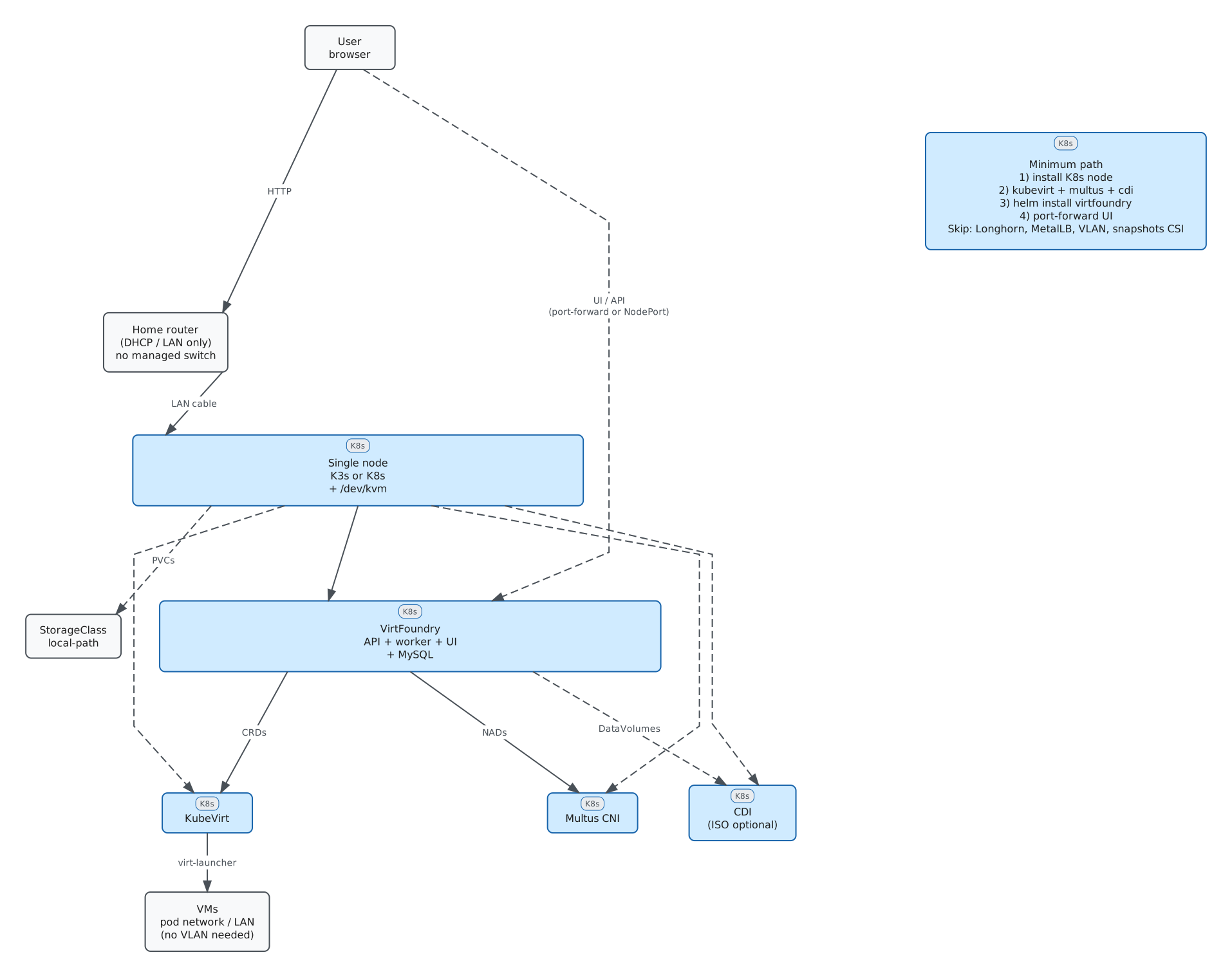
| Capability | Works? | Notes |
|---|---|---|
| Install VirtFoundry + deploy VMs | Yes | Needs KubeVirt + Multus (+ CDI for ISO) |
| VPC / private subnet | Yes | Isolated host bridge (virtfoundry-br0) on that node |
| Public / shared routable IPs | Optional | See Public network underlay — VLAN is not required |
| Volume snapshots | No with local-path |
Use VM snapshots; CSI (e.g. Longhorn) later |
| Survive node loss | No | Disks are local |
Production recommended
Multi-worker, Longhorn (preferred) or other replicated block storage, Ingress/Gateway + LB, tenant VPC + public/shared network, CSI volume snapshots and optional observability.
Set platform.storage.defaultClass=auto (default) or longhorn, and make Longhorn the cluster default StorageClass if you want other workloads on it too.
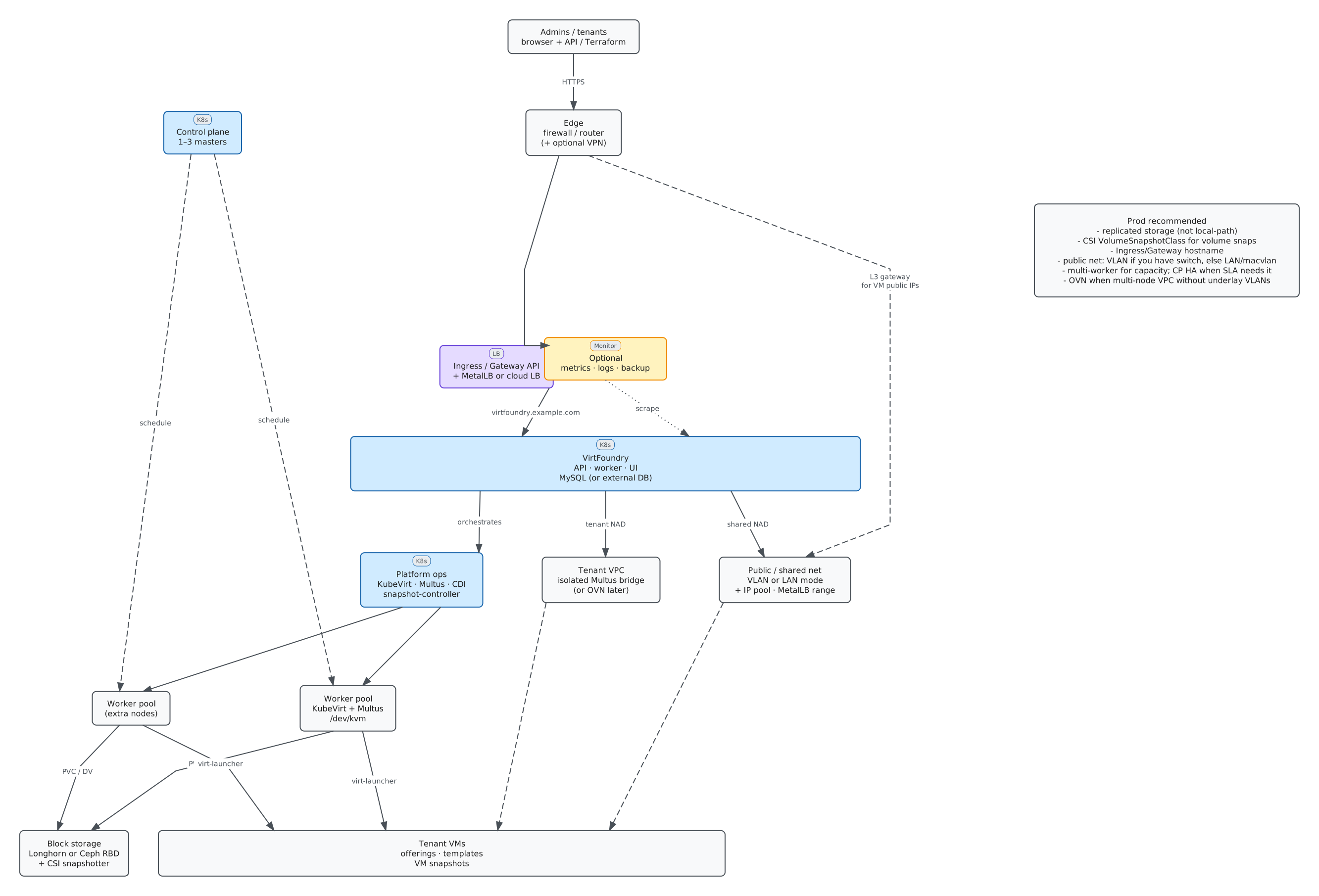
| Capability | Works? | Notes |
|---|---|---|
| VPC / private subnet | Yes | Multus isolated; multi-node same-VPC L2 may need OVN/overlay later |
| Public network | Yes | Dedicated VLAN or same LAN as the house (second NIC / existing host bridge) |
| Volume snapshots | Yes | Longhorn + CSI snapshotter + VolumeSnapshotClass |
| HA / capacity | Yes | Extra workers; CP HA when SLA requires it |
Public network underlay
platform.networking.public gives VMs a second NIC on a Linux bridge (vf-pub0 by default) plus a static IP from ipPool (cloud-init). Kubernetes node IPs, SSH, and the CNI stay on whatever network they already use.
You do not need --set for public CIDR on a single-LAN homelab: with autoFromCluster: true the chart copies a /24 from Node InternalIP. That is not a substitute for enabled: true + a safe uplink (never the kubelet NIC). VLAN beside Kubernetes: set CIDR yourself and autoFromCluster: false. Script: scripts/detect-host-public-net.sh. Written defaults: Chart values.
You do not need a VLAN. On a laptop the worked example is Kind (public off, or a second Docker network). On metal, use a VLAN or the house LAN.
The shared NAD is always CNI type bridge. Helm public.mode: macvlan is not a working NAD yet — do not use it to avoid bridging.
Never set public.bridge.uplink to the interface that holds the Kubernetes node IP, unless that NIC is already a port of a Linux bridge that owns the node address. Bridge-keeper runs ip link set <uplink> master vf-pub0 and will drop SSH/kubelet. On kind that interface is eth0.
Kind (laptop — start here)
No switch. Kind guide: public.enabled: false and reach the guest via the UI console; or attach Docker network 10.0.50.0/24 to the kind node as eth1 and use that as uplink.
A — Dedicated VLAN (homelab / production)
Tagged underlay (e.g. VLAN 50). Parent NIC keeps the node IP (untagged mgmt). Create a stable VLAN iface with the same name on every node (vlan50) and set uplink: vlan50. Guest pool and MetalLB live on that CIDR; do not put those addresses on the host.
Site example (Kubespray): vlan50 → vf-pub0 10.0.50.2/24, VMs .10–.99, MetalLB .100–.150, gateway .1 on the router.
B — No VLAN, public on the house LAN
You can still have “public” IPs next to laptops/Wi-Fi:
- Skip public —
public.enabled: false. VMs on the pod network; expose the UI with NodePort or MetalLB on the node subnet. - Second NIC — untagged on the same LAN as the router.
uplink= that NIC (same name on all nodes).cidr/gateway= the house subnet. ReserveipPool(and MetalLB if used) in the router DHCP so nothing else takes those IPs. Put a single unused address onvf-pub0(bridge.address), not a node IP. - Single NIC, already bridged — if NetworkManager already has
br0(NIC enslaved, node IP onbr0), setpublic.bridge.name: br0,uplink: "",address: "", andcidr= that LAN. Do not also createvf-pub0and enslave the same NIC.
Carve pools so they never overlap: router, DHCP dynamic range, node IPs, bridge.address, VM pool, MetalLB.
See Configuration and VPCs and networks.
See also: Installation, Configuration — Snapshots.